Guide
Bring your agent chats into Pane
TL;DR
You don't have to start over to try Pane. Pane finds the chats you already have in Claude Code, Codex, Emdash, Orca, T3 Code, Herdr and Conductor, and opens each one in a pane on the folder it ran in. The agent resumes the chat by its own session id, so it picks up where it left off. Pane deletes nothing. It works for chats run by Claude Code, Codex, Cursor's agent CLI and OpenCode.
This guide is for anyone with weeks of agent chats in another tool who wants to try Pane without losing them. Pane is a desktop app that runs coding agents side by side, each in its own pane: a terminal on its own git worktree, which is a separate checkout of your repo on its own branch.
Three ways in
One click in Settings, a first-run prompt on new installs, or just ask.
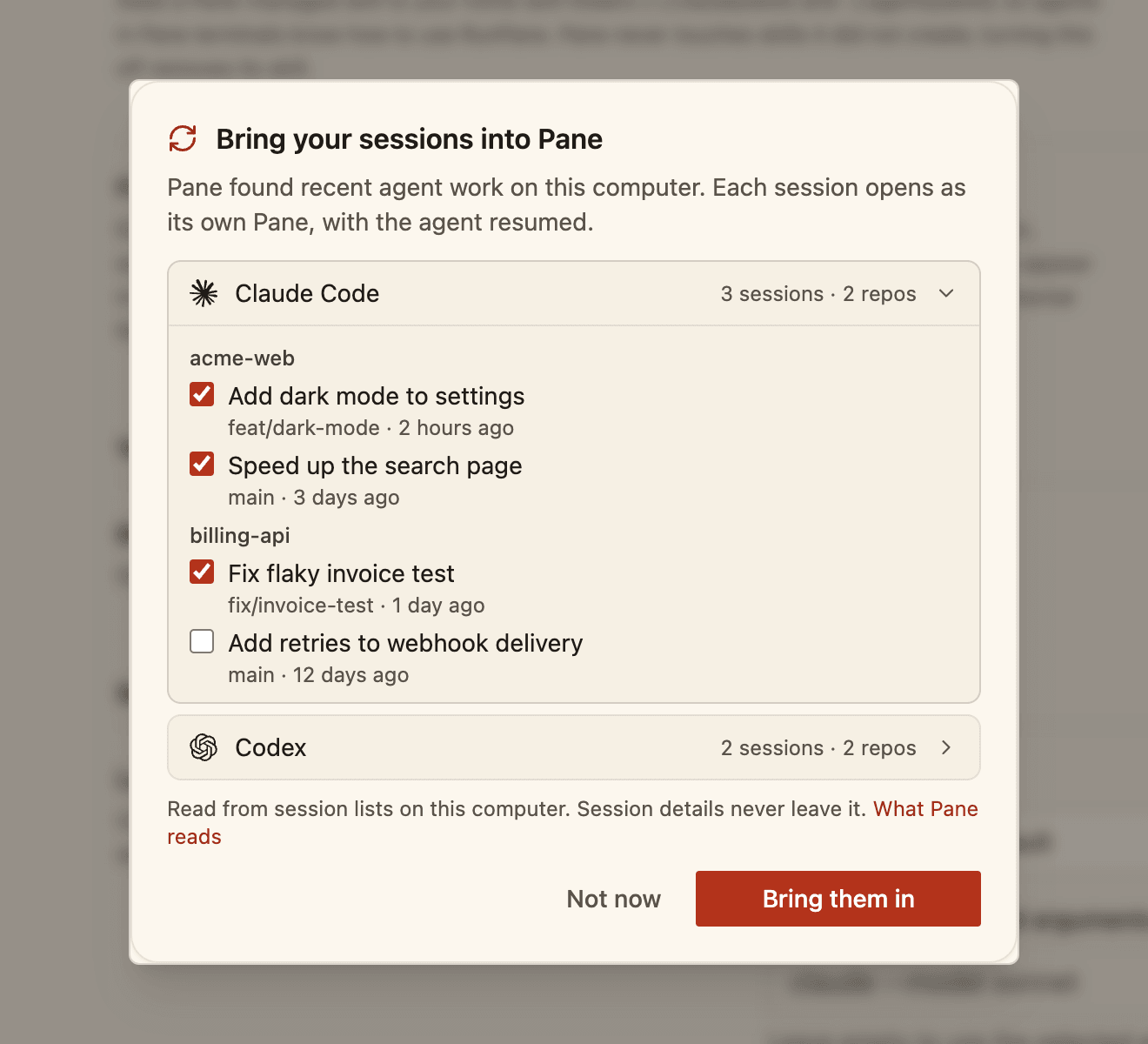
- 1Find sessions. Open Settings → AI & Agents → Bring sessions into Pane and click Find sessions. Pane lists the chats you used in the last 30 days, one row per tool, with the last 7 days already ticked (at most 3 ticked per checkout). Click a row to choose, then click Bring them in.
- 2The first-run screen. A new install asks “Bring your N sessions into Pane?”, counting chats running now or used in the last 7 days. Say Yes and Pane brings that set in, groups the work into Sessions and opens a Start here page that lists what came over and what was left out.
- 3“migrate to Pane”. Say it in any Session, the chat in Pane that runs your agents. This one goes further: it also finds Cursor agent and OpenCode chats, looks inside WSL, and forks a chat that's still running onto a new branch instead of skipping it. It shows you one list and creates nothing until you confirm.
What happens to your chats
Same folder, same chat, nothing deleted.
- → Each repo opens in place. Pane adopts the checkout where it already is as a pane. Several chats in one checkout become tabs in that one pane.
- → Each chat resumes. Every tab starts the chat's own agent with that chat's own session id, so the history is there and the agent carries on.
- → Nothing is deleted. Pane reads each tool's files on your computer, and SQLite databases from a temporary copy. A transcript a tool kept in its own agent folder is copied into your own Claude Code or Codex folder first.
- → Nothing comes in twice. Find sessions and “migrate to Pane” share one record, so running either again only adds what's new.
Which tools Pane reads
Each one read on your own computer.
| Tool | What Pane reads | Details |
|---|---|---|
| Claude Code | Your own Claude Code folder, ~/.claude. | Read more |
| Codex | Your own Codex folder, ~/.codex. | Read more |
| Emdash | Emdash's tasks and the agent each one ran. | Read more |
| Orca | The agent session of each pane Orca put to sleep. | Read more |
| T3 Code | T3 Code's threads in ~/.t3. | Read more |
| Herdr | Herdr panes whose agent reported its session id. | Read more |
| Conductor | Conductor's chats, on macOS only. | Read more |
Claude Code and Codex are both a tool and an agent: Pane reads their own folders, and it also resumes their chats when another tool ran them. If you set $CLAUDE_CONFIG_DIR or $CODEX_HOME, Pane reads that folder instead.
Which agents Pane resumes
Claude Code, Codex, Cursor's agent CLI and OpenCode.
The agent matters as much as the tool. An Emdash task, an Orca pane or a T3 Code thread comes into Pane only if one of these four agents ran it.
What's left out, and why
Pane brings a chat in only when it can resume the real thing.
Pane would rather leave a chat out than open a fresh agent and pretend it's the old one. So these stay where they are:
- → Chats run by other agents. Amp, Gemini, Copilot and the rest are listed with a note that Pane can't resume them yet.
- → Chats still running elsewhere, in Find sessions. They're listed but can't be picked, and neither can other chats in the same checkout. For Emdash, Orca and Herdr, having the app open is enough to count as running. Quit them and press Check again, or say “migrate to Pane”, which forks them onto a new branch with your uncommitted files and leaves the original running.
- → A running Cursor chat. Cursor has no way to fork a chat, so “migrate to Pane” leaves it alone. Close it in Cursor and ask again.
- → Runs that aren't chats.
claude -pand Agent SDK runs,codex execruns, and subagent threads. - → Claude Code chats started in a subfolder. Find sessions can't place them. “migrate to Pane” can.
- → Tools Pane doesn't read. For anything not listed above, try “migrate to Pane”: it looks for any tool that keeps resumable chats and treats it the same way.
One chat, one app
Don't drive the same chat from two apps at once.
Once a chat is open in Pane, keep working on it there. If the old tool and Pane both drive the same chat, they both write to the same transcript. Keep using the old tool for the chats you didn't bring over.
Sources
- What we ran
- → Checked against Pane v2.4.214's docs and source on November 5, 2026
- Corrections
- If anything here is wrong or out of date, tell us and we'll fix it and update the date at the top. Open an issue on GitHub
- Sources
frequently asked questions
By Parsa Khazaeepoul, co-founder of Pane. .